
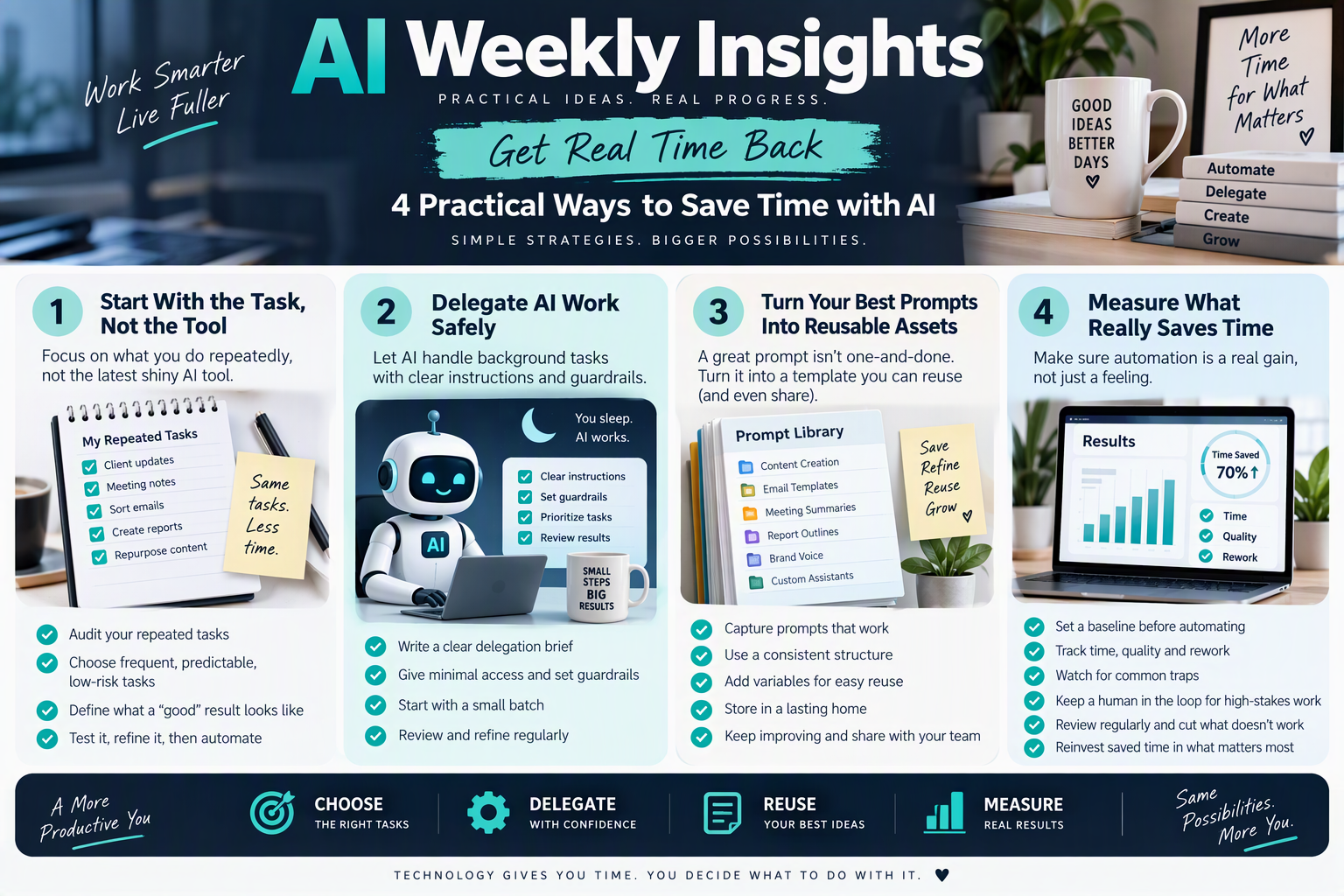
AI Weekly Insights
This week’s issue is about getting real time back. Four practical pieces on choosing what to automate, delegating work to AI safely, turning your best prompts into reusable assets, and measuring whether any of it is paying off.
Start With the Task You Repeat, Not the Tool You Admire
Every week a new AI tool promises to save you hours. Most people respond by signing up for three of them, using each twice, and drifting back to their old habits. The fix isn’t a better tool. It’s a better starting point.
Begin with a simple audit. For one week, keep a running list of anything you do more than twice that follows roughly the same steps: writing the weekly client update, formatting meeting notes, sorting incoming email, pulling numbers into a report, or repurposing a long post into short ones. Don’t judge the list yet. Just capture it. By Friday you’ll likely have fifteen to twenty items, and a few of them will make you wince at how much time they quietly eat.
Next, score each item with three questions. How often does it happen? How predictable are the steps? And how costly is a small mistake? The best first candidates are frequent, predictable and low-risk: a weekly summary, a first draft of a routine email, a content outline. Tasks that are rare, highly creative or high-stakes, such as legal wording or financial filings, should wait until you’ve built confidence and a review habit.
Once you’ve picked one task, write down what a “good” result looks like before you touch any AI. This is the step most people skip, and it’s the one that makes automation work. Describe the input you start with, the output you want, the tone, the length, and any rules that must never be broken. If you can’t describe a good result, an AI tool can’t produce one consistently either.
Then run the task by hand with AI three times, adjusting your instructions each time. Save the version that works best. Only after it works reliably should you consider connecting it to other apps or scheduling it to run on its own. Automating a messy process just produces messy results faster.
Here’s what that looks like in practice. A freelance marketer spends ninety minutes every Monday turning last week’s call notes into a client recap. She writes down what a good recap contains (three wins, two open items, clear next steps, friendly but brief), tests a prompt on three weeks of old notes, and ends up with a reusable set of instructions. Monday’s recap now takes about fifteen minutes, most of it spent reviewing rather than writing from scratch.
There’s a bonus to this approach: it also shows you which tasks should never have been on your plate. Some items on your audit list won’t need AI at all. They’ll need to be delegated to a person, simplified, or dropped entirely. Removing a pointless task beats automating it.
Let AI Work While You Sleep: Delegating Background Tasks Safely
One of the most useful shifts in AI right now is that assistants are no longer limited to answering a question and waiting for your next message. Many tools can now take on longer jobs, work through a list of steps, and hand you a finished result later. That changes how you can plan your day: instead of sitting beside a task, you can assign it and walk away.
Good candidates for background work share a few traits. They’re batchable, meaning you have several similar items to process, such as editing a handful of recorded videos, summarizing a stack of documents, cleaning up a spreadsheet, or drafting replies to routine inquiries. They’re self-contained, with all the files and instructions the AI needs in one place. And they’re reviewable, so you can check the output quickly in the morning rather than redoing it from scratch.
Write a delegation brief. Delegation fails when instructions are vague. Treat the AI like a new team member on their first day. State the goal, list the files or folders to use, describe the format of the finished result, and say what to do when something is unclear. A line such as “If a file is missing or a decision is needed, skip that item and list it at the end” stops the tool from guessing and quietly producing something wrong.
Set guardrails first. Give the AI the minimum access it needs. Point it at a single working folder rather than your whole drive. Ask it to create new files instead of overwriting originals, so you can always go back. Avoid letting an automated task send emails, publish posts or spend money without a human approving it. Draft-only is a good default: the AI prepares, you press send.
Prioritize and stage. If you hand over ten items, tell the AI the order of importance, so that if it runs out of time or hits a snag, the most valuable work is already done. For a first attempt, start with two or three items instead of twenty. A small test reveals problems in your instructions before they’re multiplied.
Build a morning review habit. Background work is only as good as the check you do afterwards. Block fifteen minutes to review results with a simple checklist: Is it complete? Is it accurate? Does it match our standards? Does anything need a decision from me? Keep notes on what went wrong and fold those lessons back into your brief so the next run improves.
Here’s an example. A small agency owner records several short videos on a Saturday afternoon, drops them into a shared folder along with transcripts and brand colors, and asks an AI tool to prepare edited versions overnight. On Sunday morning she reviews them, requests two small tweaks, and schedules the posts. The whole job took about thirty minutes of her attention instead of a full evening.
A word of caution: availability of these features varies by tool, plan and region, and they change quickly. Check what your own account supports before building a routine around it.
Turn Your Best Prompts Into Reusable Skills and Templates
If you find yourself retyping the same instructions to an AI every few days, you’re leaving productivity on the table. A prompt that produced a great result once is an asset. Treating it like a throwaway message means you’ll spend time recreating it, and the quality will vary every time.
Start by capturing the winners. After any AI task that went well, copy the instruction you used into a single document or notes app. Don’t wait until you have a perfect system. A messy list of prompts that worked is better than a clean list of none.
Then tidy each prompt into a consistent structure. A reliable template usually includes: the context (who you are and who the output is for), the task (what exactly to do), the inputs (what you’ll provide each time), the format (length, layout, tone), the rules (things to always do or never do), and, if possible, a short example of a good result. Examples are especially powerful because they show the standard you expect better than a paragraph of description can.
Next, replace the details that change with variables. Instead of writing “summarize this call for Acme Corp,” write “summarize this call for [CLIENT NAME], focusing on [TOPIC].” Even better, add a line telling the AI to ask you for any variables it’s missing before it begins. That way you never have to scan the prompt hunting for blanks to fill in; you simply paste it, say “ask me for anything missing,” and answer the questions.
Once a prompt is stable, consider moving it into a more permanent home. Many AI tools now let you save instructions as projects, custom assistants or reusable skills, so the AI loads your standards automatically. These are ideal for things like your writing voice, your brand colors and tone, your report format, or your review checklist. Put your brand guidelines in one place and every new task starts from the same baseline.
Keep your library healthy with a little maintenance. Give each item a clear name, note the date and what it’s for, and retire versions that have been replaced. When a result comes out wrong, fix the template instead of just editing the output. One improvement to the prompt benefits every future run.
If you work with a team, sharing is where the real gains appear. A shared prompt library means a new colleague can produce on-brand work on their first day, and your best practices don’t live in one person’s head. Hold a short monthly review where people add what’s working and prune what isn’t.
A useful test is whether someone else could pick up your template and get a good result without asking you questions. If yes, it’s ready to share. If not, it needs clearer inputs or a better example.
Measure What Automation Really Saves, and Where It Backfires
Automation feels productive, which is exactly why it deserves a second look. It’s easy to feel faster without being faster, especially when a tool saves ten minutes of writing but adds fifteen minutes of checking, fixing and reformatting. Before you roll out another workflow, find out whether it actually pays off.
Start with a baseline. Before automating, time the task for a couple of runs, and note how good the results are. Without a “before” number, you can’t prove an “after.” Then track three simple measures: time (including review and correction, not just generation), quality (did the result meet your standard on the first pass?), and rework (how often did you have to redo or fix something?). A workflow that’s quick but needs heavy rework isn’t saving you anything.
Watch for the common traps. The first is over-automating relationship moments. Condolences, difficult feedback, sensitive client conversations and personal introductions land better with a human voice. Use AI to organize your thoughts, not to replace your presence. The second is compounding errors. When one automated step feeds another, a small mistake early on can quietly spread through everything downstream. Add a review checkpoint after any step that matters.
The third trap is data exposure. Before pasting client records, financial details or personal information into any tool, check your organization’s policies and the tool’s data settings. If you’re unsure, anonymize the details or keep that task manual. The fourth is tool sprawl. Every new subscription carries a monthly cost and another login to manage. Ask whether an existing tool can already do the job before adding another.
Build a human checkpoint into anything customer-facing or high-stakes. A simple rule works well: AI can draft, summarize, sort and propose, but a person approves anything that is sent, published, paid or signed.
Schedule a monthly review of your workflows. For each one, ask: Is it still saving time? Has the task changed? Are people using it? Retire the ones that no longer earn their place and improve the ones that are close. It’s normal for a few experiments to fail, and cutting them quickly is part of the process.
Finally, decide in advance what you’ll do with the time you get back. If saved hours simply fill up with more low-value tasks, the benefit disappears. Reinvest them in the work only you can do: strategy, relationships, creative thinking, and rest.
That’s this week’s issue of AI Weekly Insights. Pick one idea, try it this week, and see what changes.
Comments are closed